View and Download Owner Statement
Log in to your Buildium account at kileymgmt.managebuilding.com.
If you do not have Buildium login credentials, please email hello@teamkiley.com with your name, phone number, company name (if applicable), and at least one street address in your portfolio.
Select Reports.
Select "Rental Owner Statement."
Select the date of the statement you would like to view.
Select “Transaction details” to see every line item. Press “Run report.”
To download a PDF of the statement, select “Export” and “PDF - Landscape (.pdf)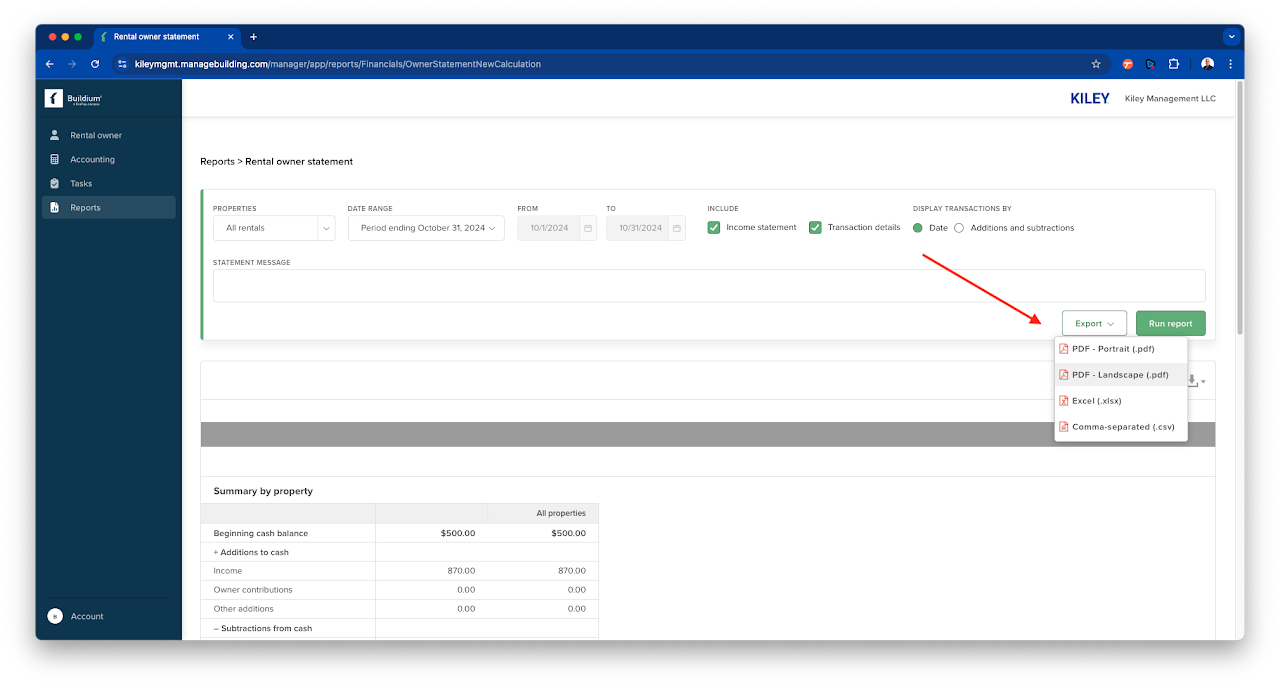

Related Articles
View Paid and Unpaid Bills
Log in to your Buildium account at kileymgmt.managebuilding.com. If you do not have Buildium login credentials, please email hello@teamkiley.com with your name, phone number, company name (if applicable), and at least one street address in your ...2FA For Owner Accounts
Two-factor authentication (2FA) is not required for owner accounts in Buildium as owner access is view-only. Owners cannot update banking information for owner draws or store other sensitive financial data within the portal. All changes to bank ...How to Make a Payment Through Buildium
Click on "Make payment." When a payment is requested, you will receive an email with “New contribution request” in the subject line. Log in to your Buildium account at kileymgmt.managebuilding.com. If you do not have Buildium login credentials, ...Understanding the Landlord/Tenant dispute process
As a property owner, deciding to move forward with the landlord/tenant dispute process can be a difficult decision. At Kiley Management, we understand the importance of making an informed choice. Below, we've outlined the steps you can expect if you ...Why Section 8 Payments May Fluctuate Periodically
We understand that receiving consistent rental income is important for our owner clients. If your property has a Section 8 (Housing Choice Voucher Program) tenant, you may notice that the amount paid by the local Housing Authority (such as the ...